
手写 Huggingface RAG 系统(3)——构建向量数据库与生成
有了前面的 Embedding 模型,我们就可以用这个模型将 chunk 内容转换成向量,然后构建向量数据库了。
1. 混合索引
在讲解具体构建过程前,我们简单介绍一下混合索引的概念。
最初的版本是没引入混合索引的,但是在使用 RAG 系统的过程中发现
AutoModel这个模块的检索效果不太好,就引入了。
在检索向量时,以 AutoModel 为例,我们需要检索下面两类文档:
- 语义相关:如
AutoModelForMaskedLM这样的虽然不是AutoModel但是和AutoModel关联很大的。 - 关键词相关:如
AutoModel的定义文档。
这在检索中分别称作关键词检索 (Sparse Retrieval) 和向量检索 (Dense Retrieval)。它们有如下的优点与不足:
| 查询类型 | 关键词检索表现 | 向量检索表现 |
|---|---|---|
包含专有名词 (如 AutoModel) | 优秀 (精确匹配) | 可能不佳 (可能找到通用概念) |
| 概念性/模糊查询 (如: “如何提升检索质量?”) | 可能不佳 (匹配不到确切词) | 优秀 (理解语义) |
| 新词/领域黑话 (如: DoRA 微调) | 优秀 (只要文档里有) | 可能不佳 (模型未见过) |
以具体的文档为例,Huggingface 的 AutoModel 定义文档 auto.md 如下:
# Auto Classes

In many cases, the architecture you want to use can be guessed from the name or the path of the pretrained model you
are supplying to the `from_pretrained()` method. AutoClasses are here to do this job for you so that you
automatically retrieve the relevant model given the name/path to the pretrained weights/config/vocabulary.

Instantiating one of [`AutoConfig`], [`AutoModel`], and
[`AutoTokenizer`] will directly create a class of the relevant architecture. For instance

```python
model = AutoModel.from_pretrained("google-bert/bert-base-cased")
```

will create a model that is an instance of [`BertModel`].

There is one class of `AutoModel` for each task.

## Extending the Auto Classes

Each of the auto classes has a method to be extended with your custom classes. For instance, if you have defined a
custom class of model `NewModel`, make sure you have a `NewModelConfig` then you can add those to the auto
classes like this:

```python
from transformers import AutoConfig, AutoModel

AutoConfig.register("new-model", NewModelConfig)
AutoModel.register(NewModelConfig, NewModel)
```

You will then be able to use the auto classes like you would usually do!

## Natural Language Processing

The following auto classes are available for the following natural language processing tasks.

### AutoModelForCausalLM

[[autodoc]] AutoModelForCausalLM

### AutoModelForMaskedLM

[[autodoc]] AutoModelForMaskedLM

### AutoModelForMaskGeneration

[[autodoc]] AutoModelForMaskGeneration

### AutoModelForSeq2SeqLM

[[autodoc]] AutoModelForSeq2SeqLM

### AutoModelForSequenceClassification

[[autodoc]] AutoModelForSequenceClassification

......
这是一个很典型的例子:这个文档定义了 AutoModel 概念的关键文档,但是里面只有很浅显的 AutoModel 的定义并且大部分都是对其他文档的索引,语义上更相关的反而是后面列举的索引文档:
## Natural Language Processing

The following auto classes are available for the following natural language processing tasks.

### AutoModelForCausalLM

[[autodoc]] AutoModelForCausalLM

### AutoModelForMaskedLM

[[autodoc]] AutoModelForMaskedLM
......
如果只使用向量检索,搜出来的就会是下面的文档:
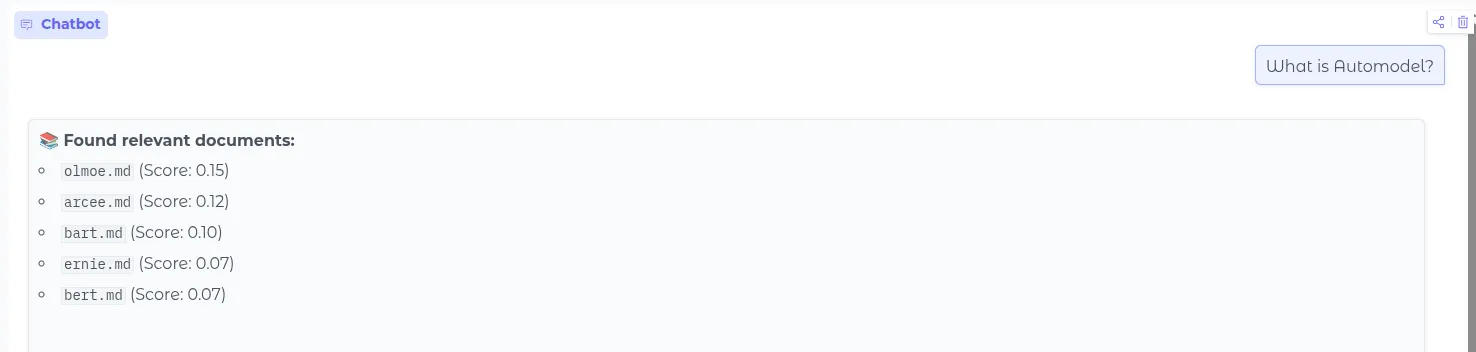
这个是最初的只使用向量检索的项目。
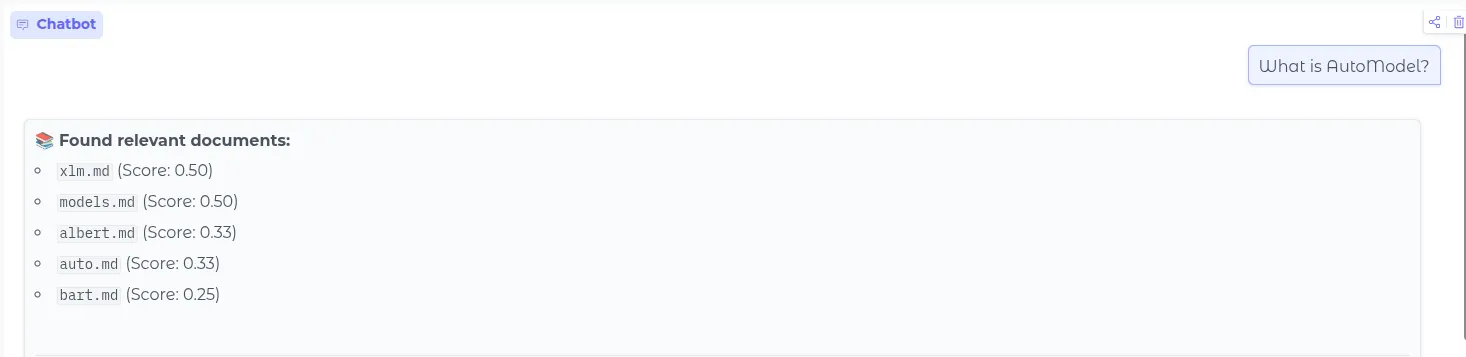
而通过混合使用这两种检索方法,我们可以让 RAG 同时考虑到语义与关键词的匹配。最终可以检索到 auto.md 这个文档:
2. 具体实现
向量数据库准备
我们先创建 Qdrant Client,然后分别存放 dense vector 和 sparse vector:
client = QdrantClient(path=qdrant_path)
collection_name = 'huggingface_transformers_docs'

client.delete_collection(collection_name)

client.create_collection(
  collection_name=collection_name,
  vectors_config={
    "text-dense": models.VectorParams(
      size=dense_dim,
      distance=models.Distance.COSINE,
    )
  },
  sparse_vectors_config={
    "text-sparse": models.SparseVectorParams(
      index=models.SparseIndexParams(
        on_disk=True,
      )
    )
  }
)向量生成
对于语义相关向量,我们从 Hugggingface 加载我们先前微调好的模型,然后根据输入生成生成对应向量即可:
output_path = f"{base_dir}/ft-jina-transformers-v1"
dense_model = SentenceTransformer(output_path, trust_remote_code=True)

...
dense_vectors = dense_model.encode(batch_texts, convert_to_tensor=False).tolist()
对于关键词向量,我们用 Qdrant 内置的 fastembed 模型即可:
from fastembed import SparseTextEmbedding
sparse_model = SparseTextEmbedding(model_name="prithivida/Splade_PP_en_v1")
...
sparse_vectors = list(sparse_model.embed(batch_texts))
Qdrant 的
fastembed对 SPLADE 进行了优化,而且这个模型只需要做好关键词匹配的工作即可,并不需要非常精确,不需要自己去训练完成的 SpraseTextModel。
生成向量之后,将它们存入数据库:
payload = {
  "text": doc["text"],
  "source": doc.get("metadata", {}).get("source", "unknown"),
  "headers": doc.get("metadata", {}).get("headers", []),
  "full_metadata": doc.get("metadata", {})
}

points.append(models.PointStruct(
  id=doc_id_hash,
  payload=payload,
  vector={
    "text-dense": d_vec,
    "text-sparse": qdrant_sparse_vec
  }
))
3. 混合检索
在构建完向量数据库后,我们就可以开始搜索了。我们需要同时使用语义向量与关键词向量进行搜索,这里我们使用 RBF 算法:
results_hybrid = client.query_points(
  collection_name=collection_name,
  prefetch=[prefetch_dense, prefetch_sparse],
  query=models.FusionQuery(fusion=models.Fusion.RRF),
  limit=5,
  with_payload=True
).points
总体代码如下:
可以看到在最终的简单对比试验中,我们的混合检索成功搜索到了 auto.md 这个文档:
--- ONLY DENSE (Semantic) Results ---
1. [0.7454] model_doc/albert.md | Context: ALBERT > Pipeline > AutoModel  #### AutoModel  ```py import torch from transformers import ...
2. [0.7410] model_doc/hubert.md | Context: HuBERT > Pipeline > AutoModel  #### AutoModel  ```python import torch from transformers imp...
3. [0.7388] model_doc/vits.md | Context: VITS > Pipeline > AutoModel  #### AutoModel  ```python import torch import scipy from IPyth...
4. [0.7324] model_doc/bart.md | Context: BART > Pipeline > AutoModel  #### AutoModel  ```py import torch from transformers import Au...
5. [0.7308] model_doc/vit_mae.md | Context: ViTMAE > AutoModel  #### AutoModel  ```python import torch import requests from PIL import ...

--- ONLY SPARSE (Keyword/SPLADE) Results ---
1. [19.7641] model_doc/auto.md | Context: Auto Classes  # Auto Classes  In many cases, the architecture you want to use can be guesse...
2. [18.8307] models.md | Context: Loading models > Model classes > AutoModel  #### AutoModel  The AutoModel class is a conven...
3. [18.6722] model_doc/cohere.md | Context: Cohere > Notes  ## Notes  - Don't use the dtype parameter in `~AutoModel.from_pretrained` i...
4. [16.4616] tasks/image_feature_extraction.md | Context: Image Feature Extraction > Getting Features and Similarities using `AutoModel`  ## Getting ...
5. [16.2580] troubleshooting.md | Context: Troubleshoot > ValueError: Unrecognized configuration class XYZ for this kind of AutoModel ...

--- HYBRID (RRF Fusion) Results ---
1. [0.5000] model_doc/albert.md | Context: ALBERT > Pipeline > AutoModel  #### AutoModel  ```py import torch from transformers import ...
2. [0.5000] model_doc/auto.md | Context: Auto Classes  # Auto Classes  In many cases, the architecture you want to use can be guesse...
3. [0.3333] model_doc/hubert.md | Context: HuBERT > Pipeline > AutoModel  #### AutoModel  ```python import torch from transformers imp...
4. [0.3333] models.md | Context: Loading models > Model classes > AutoModel  #### AutoModel  The AutoModel class is a conven...
5. [0.2500] model_doc/vits.md | Context: VITS > Pipeline > AutoModel  #### AutoModel  ```python import torch import scipy from IPyth...
4. 生成部分
完成了 Retrieval 部分后,剩下的就是较为简单的 Generation 了,我们使用 Deepseek API 来完成这个任务。
生成部分的总体流程是在前面的混合检索完成后,将检索结果发送给 LLM,让 LLM 根据检索结果生成回答:
def generate(self, query: str, search_results):
  if not search_results:
    return "I'm sorry, but I couldn't find any relevant information in the knowledge base regarding your query."

  context_pieces = []
  for idx, hit in enumerate(search_results, 1):
    source = hit.payload.get('source', 'unknown')
    filename = source.split('/')[-1] if '/' in source else source
    text = hit.payload['text']

    piece = f"""<doc id="{idx}" source="{filename}">
{text}
</doc>"""
    context_pieces.append(piece)

  context_str = "\n\n".join(context_pieces)

  system_prompt = """You are an expert AI assistant specializing in the Hugging Face Transformers library and NLP technology.

YOUR MISSION:
Answer the user's question using ONLY the provided "Retrieved Context". Do not rely on your internal knowledge base unless it is to explain syntax or general programming concepts not covered in the documents.

GUIDELINES:
1. **Grounding**: Base your answer strictly on the provided context chunks.
2. **Code First**: If the context contains code examples, prioritize showing them in your answer using Python markdown blocks.
3. **Citation**: When referencing specific information, cite the source file name (e.g., `[model_doc.md]`).
4. **Honesty**: If the provided context does not contain enough information to answer the question, state: "The provided documents do not contain the answer to this question." Do not hallucinate or make up parameters.
5. **Clarity**: Keep explanations concise and technical.

Output Format:
- Use Markdown for formatting.
- Use `code blocks` for function names and parameters.
"""

  user_prompt = f"""
### User Query
{query}

### Retrieved Context
Please use the following documents to answer the query above:

{context_str}

### Answer
"""

  print(f"\nThinking (Processing {len(search_results)} context chunks)...")

  try:
    response = self.llm_client.chat.completions.create(
      model="deepseek-chat",
      messages=[
        {"role": "system", "content": system_prompt},
        {"role": "user", "content": user_prompt},
      ],
      temperature=0.1,
      max_tokens=4096,
      stream=True
    )

    full_response = ""
    print("-" * 60)
    for chunk in response:
      if chunk.choices[0].delta.content:
        content = chunk.choices[0].delta.content
        print(content, end="", flush=True)
        full_response += content
    print("\n" + "-" * 60)
    return full_response

  except Exception as e:
    return f"Error calling LLM: {e}"
完整代码如下:
最终我们的 RAG 系统就完成了。然后用 Gradio 简单封装一下就可以 push 到 Huggingface Space 中了。